Getting Started
This guide walks you through installing Scriptorium.Quill and Scriptorium.Nib, writing your first test, and running it.
Prerequisites
Section titled “Prerequisites”Required:
- .NET SDK/Runtime
- Fable
Depending on the target you run:
- Node.js — for the JavaScript and TypeScript targets
- Python 3 with
fable-libraryinstalled
-
Create a test project
Terminal window dotnet new console -lang F# -n YourProjectNamecd YourProjectName -
Add the packages
Terminal window dotnet add package Scriptorium.Quilldotnet add package Scriptorium.Nib -
Write your first test
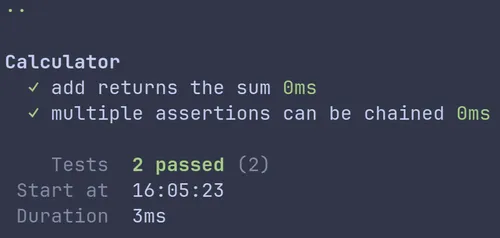
Program.fs module YourProjectName.Mainopen Scriptorium.Nib.Assertionopen type Scriptorium.Quill.Testopen type Scriptorium.Quill.Runner[<EntryPoint>]let main _ =runTests [testList ("Calculator", [test ("add returns the sum", fun _ ->assertThat (1 + 1) (isEqualTo 2))test ("multiple assertions can be chained", fun _ ->assertThat 42 (isGreaterThan 0>> isLessThan 100>> isNotEqualTo 0))])] -
Finally run the tests
Terminal window # .NETdotnet run# JavaScriptdotnet fable --runScript# TypeScriptdotnet fable --lang typescript -o build-ts --run npx tsx build-ts/Program.ts# Python (needs fable-library in the environment)dotnet fable --lang python -o build-py --run uv run --frozen python build-py/program.pyThe same test suite runs unchanged on every target.
You should see output like this:
What’s next?
Section titled “What’s next?” Test DSL Async tests, focus mode, pending tests, and testSequenced in Scriptorium.Quill.
Assertion functions Learn how to write and compose assertions.
Snapshot testing Don't worry about writing assertions for complex objects. Just snap and compare.
DOM testing Playwright-powered DOM assertions and browser test helpers.