VS Code
VS Code is a popular, lightweight code editor developed by Microsoft. It has excellent support for F# development through the Ionide extension. It also supports a wide range of extensions useful for web development with Feliz.
Download VS Code from the official website.
You can add a list of recommended extensions for your project by creating a .vscode/extensions.json file in your project folder. This will trigger a prompt in VS Code suggesting to install the recommended extensions when the project is opened.
.vscode/extensions.json
{
    // See http://go.microsoft.com/fwlink/?LinkId=827846 to learn about workspace recommendations.
    // Extension identifier format: ${publisher}.${name}. Example: vscode.csharp

    // List of extensions which should be recommended for users of this workspace.
    "recommendations": [
        "ionide.ionide-fsharp",
        "ms-dotnettools.csharp",
        "editorconfig.editorconfig",
        "bradlc.vscode-tailwindcss"
    ],
    // List of extensions recommended by VS Code that should not be recommended for users of this workspace.
    "unwantedRecommendations": [

    ]
}
Features
Ionide
Full Support for F# and .NET. Without this it does not make sense to use VS Code for F# development 😉.
Install the Ionide extension from the VS Code marketplace to get started.
Fantomas
Fantomas is part of the Ionide extensions and can be used to format your F# code. this helps readability and maintainability of your codebase, while giving you peace of mind that your code is consistently formatted.
With VS Code you can easily run Fantomas on save, so your code is always formatted when you save a file. This can even be pushed to source control to share this setting with your team.
{
    "[fsharp]": {
        "editor.formatOnSave": true,
        "editor.defaultFormatter": "Ionide.Ionide-fsharp"
    }
}
Tailwind CSS Support
The official tailwindCSS extension can be configured to provide IntelliSense support for Tailwind CSS classes used in Feliz applications.
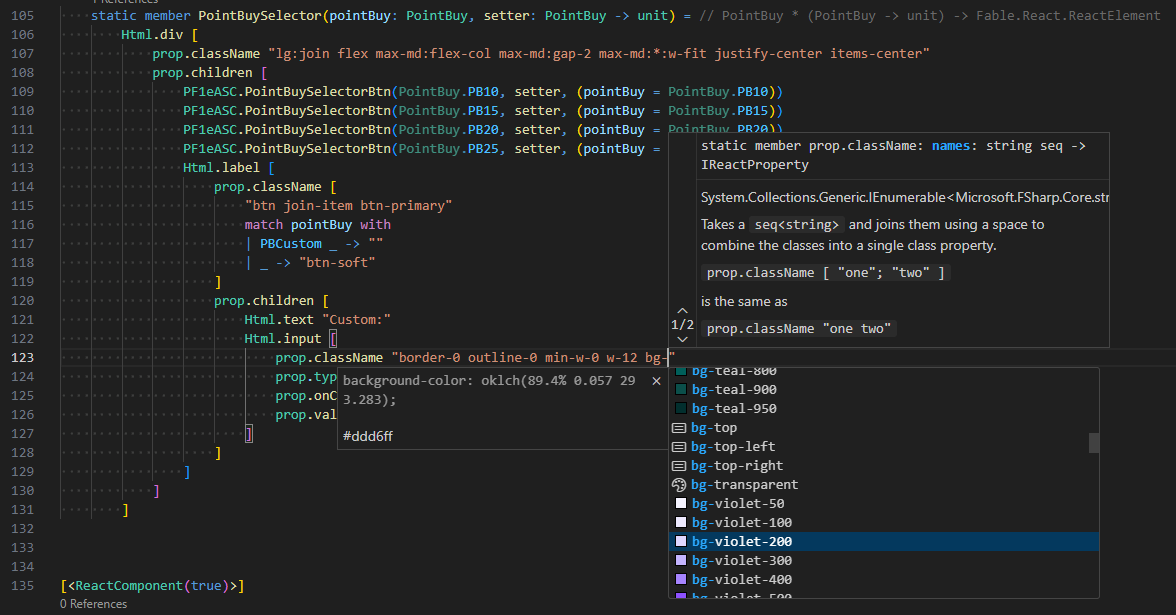
- Install the Tailwind CSS IntelliSense extension.
- Add the following configuration to your
.vscode/settings.jsonfile to enable support for F# files:
{
    "tailwindCSS.includeLanguages": {
        "fsharp": "html"
    },
    "tailwindCSS.experimental.classRegex": [
        "\\.className\\s+\"([^\"]*)\"",
        ["\\.className\\s+\\[([^\\]]*)\\]", "\"([^\"]*)\""]
    ]
}